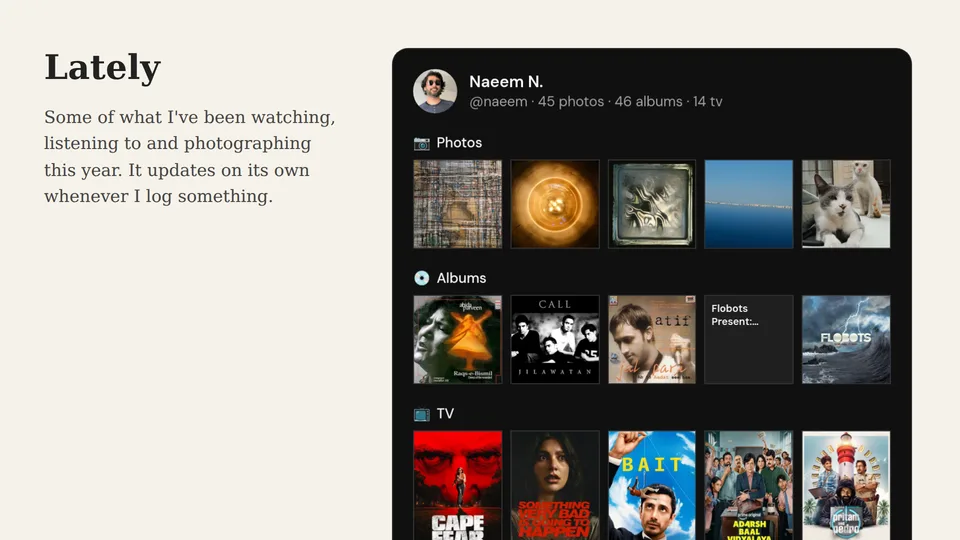
A lot of personal sites have a "now" page or a "currently reading" box in the sidebar, and most of them go stale within a month because someone has to remember to edit them. The Logfolio card fixes the remembering part. It shows a row of covers from each part of your log, and when you log a new book or film, the card on your site changes with it.
What the card shows
At the top there's your picture, your name, and how many things you've logged in each section on the card. Under that, each section gets one row of five covers, picked and ordered the same way as on your profile. On a small phone the rows drop to four covers so they stay big enough to read.
Only sections with covers can go on the card, which means books, films, TV, games, albums, photos, and any of your own types that use a grid. Private entries never appear, and neither do your reviews, because the card only shows what's already on your public profile. If your whole profile is private, the card shows nothing.
Set it up
Open Settings and choose Get the card under Embed your profile. The page has the live card on the left and the settings on the right. Sections, switches, and websites save as soon as you change them:
- Enable card turns the card on or off. When it's off, other sites can't show it, but you can still see the preview.
- Where it can appear is either Any website or Only my websites. With Only my websites, you add your domains, like
example.com, and the card works there and on its subdomains, likewww.example.comorblog.example.com. Every other site gets nothing. - Sections is where you tick the parts of your log you want on the card.
- Look is Light or Dark, so the card matches your site. It changes the line you copy rather than a saved setting.
Add it to your site
Copy the line under Add it to your site and paste it where the card should go. It looks like this:
<script src="https://logfolio.co/embed.js" data-user="yourname" data-theme="dark"></script>
The card fills the width it's given, up to 640 pixels, and sets its own height, so there's no scrollbar and no gap underneath. If you delete the data-theme part, the card follows each visitor's light or dark setting instead.
Anywhere that lets you paste HTML with a script tag works, like a page on a static site or, as an administrator, a Custom HTML block in a self-hosted WordPress site. Places that strip scripts out, like a GitHub README, won't show it.
How fast it updates
Browsers keep a copy of the card for five minutes, so someone who reloads your page right away sees the same card. After that, new visitors get your latest log. The preview in Settings always shows the current version.
Free and Pro
The card is free. Free cards end with a small "Powered by Logfolio" line, and Pro can hide it with Hide "Powered by Logfolio" in the same settings.